
Detecting a hidden earpiece starts with defining what the exam system can observe. Bluetooth checks can add information about detectable wireless devices near the exam workstation. TrustExam automatically identifies prohibited devices among the Bluetooth devices it detects and can display an instruction to the participant, as the example below shows.
For universities, certification bodies and testing centres, the practical question is which device checks work in their exam environment and how to use the results fairly.
What does a Bluetooth check tell the organiser?
A detected signal is a technical observation. It does not, by itself, establish who owns a device, whether it is permitted, or whether it was used to receive an answer. The organiser needs a defined review process and clear device rules.
Bluetooth scanning also needs a defined technical scope. Bluetooth LE, for example, has specific discovery and scanning procedures. The fact that an application supports a Bluetooth check does not establish support for every kind of wireless earpiece. Bluetooth SIG explains these procedures in its LE Primer.
How TrustExam performs the check
TrustExam automatically identifies prohibited devices among the Bluetooth devices it detects. The technical table in the example below demonstrates detection data behind this process.
Automatic detection: the technical view and the participant screen
The screenshot brings together the participant-facing screen and a technical view of the detection data. TrustExam identifies prohibited devices automatically. The table is a demonstration of detection data, not a list in which every row is a prohibited device. It shows the devices detected by the system and their available attributes, including type, name, identifier and RSSI, alongside the fields labelled Distance, HID and Near.
On the participant-facing screen, TrustExam displays “Bluetooth device detected” and instructs the participant: “To continue, move the nearby Bluetooth device away from the workstation.” The technical table illustrates the information available for device analysis; the participant-facing message communicates the requested action.
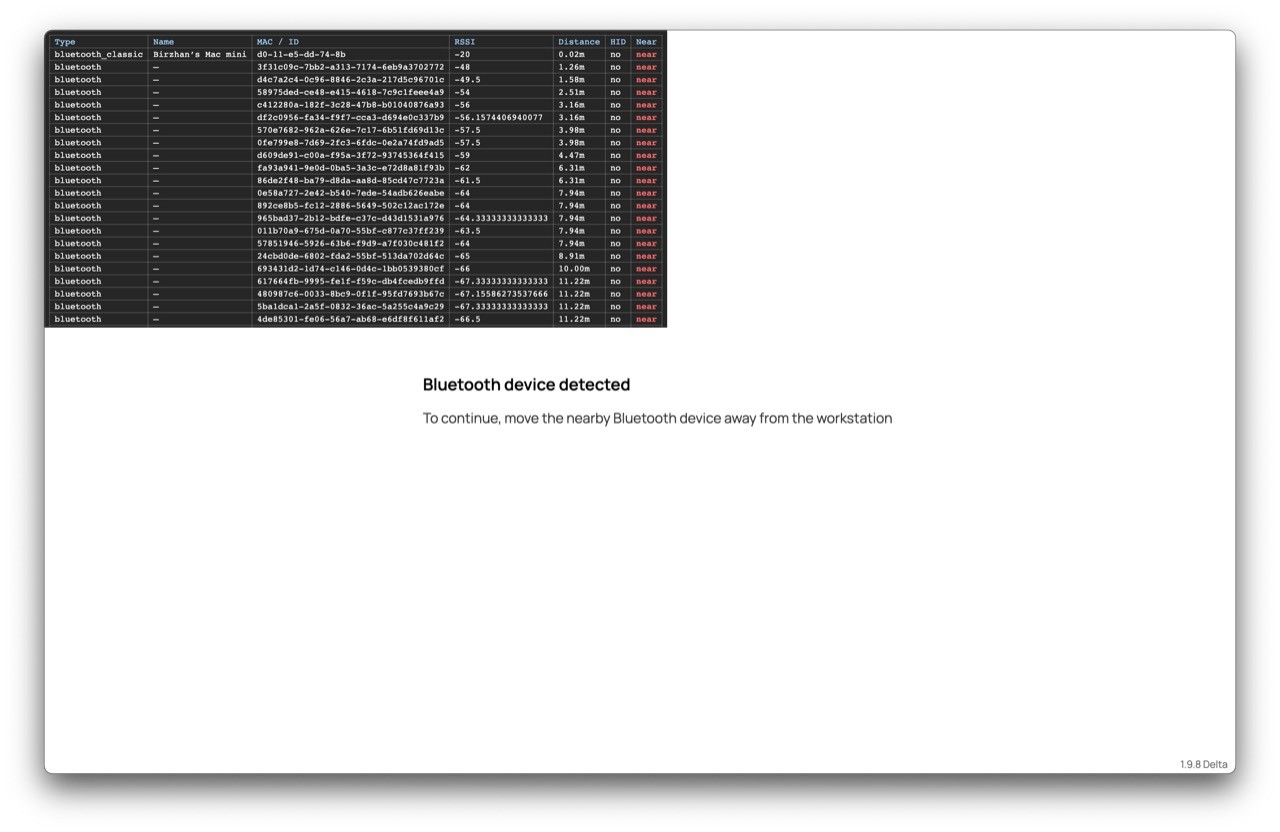
Automatic Bluetooth device detection in TrustExam: the technical table and the participant alert. Original screenshot supplied by the TrustExam team.
Open the screenshot at full size.
How to handle permitted devices and unclear results
Before the exam, tell participants which devices are permitted and how to request an adjustment. Include ordinary peripherals and approved accessibility equipment in preparation tests.
During review, consider the event alongside the session record and the participant’s explanation. A strong signal should not automatically become an accusation. Bluetooth SIG describes how antennas, transmission power and obstacles affect reception; RSSI is received signal strength. It does not by itself establish ownership or an exact distance. The Distance and Near columns in this demonstration should not be read as independently verified measurements or proof of a violation. Understanding Bluetooth range.
Define the response before the exam
The programme should define the response before rollout. An event record, a notification, a pause and hiding the questions are different actions. Participants need a clear instruction, and reviewers need a way to resolve an ambiguous event.
Document the response supported by the selected configuration, including how the exam resumes and what happens if the check cannot run. An authorised reviewer should make any decision about a rule violation.
Questions about collected data
Ask which discovered-device information is collected, how it is used, who can access it and how long it is retained. Confirm these details for the intended deployment.
What to test in a pilot
Use representative workstations and both permitted and prohibited device scenarios. Record which checks ran successfully, which intended scenarios were detected, which were missed, and which ordinary situations produced an unnecessary alert. Keep technical compatibility failures separate from detection results.
A useful pilot produces a defined scope of use and a workable response procedure. Read how to evaluate a proctoring pilot and how to review signals and appeals.
Questions organisers should ask
Does a Bluetooth signal prove cheating?
It provides information for assessment. A decision requires the exam rules and the context of the event.
Does earpiece detection also cover hidden cameras?
Coverage must be established separately for each function and device class. The name “device scanner” alone does not answer that question. For Wi-Fi camera risks, read how TrustExam’s Wi-Fi Scanner works.
Does detection switch off the device?
The example shows an instruction to move a nearby device away from the workstation. It does not demonstrate switching off the external device or disrupting its wireless connection.
Planning device checks for an exam programme? Explore TrustExam’s online proctoring workflow and exam security controls to assess Bluetooth checks alongside participant preparation and session review.
Discuss the device checks required for your exam programme. Book a demo.